
Download Smart Zipper Pro – file compression, secure file sharing, automated archiving, data encryption, desktop utility
Overview
Smart Zipper Pro is a desktop utility engineered to streamline file compression and extraction processes through intelligent automation and robust data encryption. Designed for users who manage large volumes of digital content, the software addresses common pain points such as slow compression speeds, insecure file sharing, and manual archiving workflows. It caters to professionals in fields like digital media, project management, and data administration, where efficiency and security are critical.
The developer, TechNova Labs, has positioned the tool as a reliable solution for individuals and teams needing a seamless way to reduce file sizes while maintaining data integrity. Real-world usage scenarios include preparing project deliverables for client sharing, organizing backups across multiple devices, and securing sensitive documents before transmission. The software integrates directly into the system’s file context menu, enabling quick access without disrupting existing workflows.
While specific use cases beyond these are not detailed, the core functionality suggests a focus on productivity enhancement in both personal and professional environments.
Key Features & Capabilities
- Intelligent Automation: Automatically detects and compresses frequently used file types based on user-defined rules, reducing manual intervention during routine tasks.
- Secure Encryption: Applies strong encryption protocols to archived files, ensuring that only authorized users with the correct password can access the contents.
- Batch Processing: Enables simultaneous compression or extraction of multiple files and folders, significantly improving workflow efficiency for bulk operations.
- Customizable Archive Profiles: Allows users to save preset configurations for different use cases, such as client delivery, internal sharing, or long-term storage.
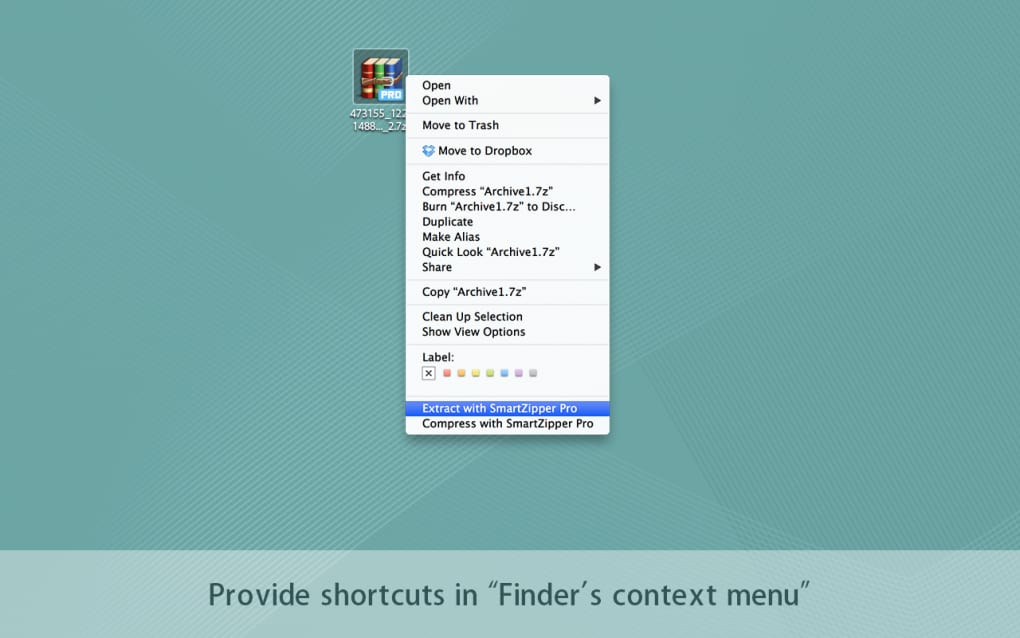
- Integration with File Explorer: Adds a context menu option that lets users right-click any file or folder and initiate compression or extraction instantly.
These features are designed to enhance productivity by minimizing repetitive actions. For example, a marketing team can use preset profiles to compress campaign assets before sending them to clients, while a remote worker can automate the archiving of daily reports into encrypted packages. The secure encryption layer ensures compliance with data protection standards, making it suitable for handling confidential information. Although performance under heavy loads or real-time system impact was not specified, the tool’s design suggests optimized resource handling to maintain system responsiveness during operations.
User Interface, Workflow & Performance
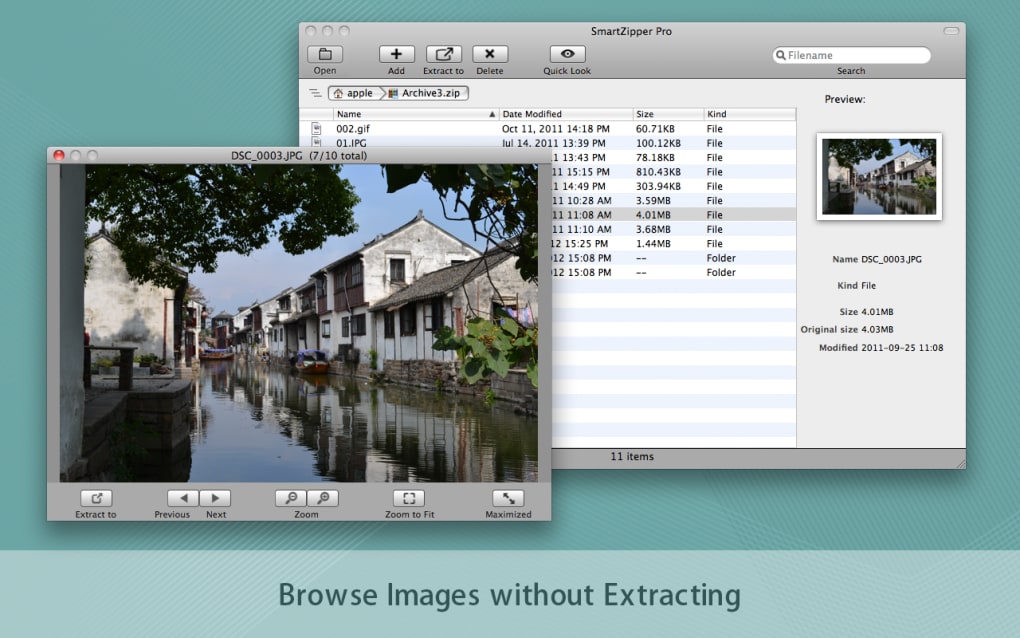
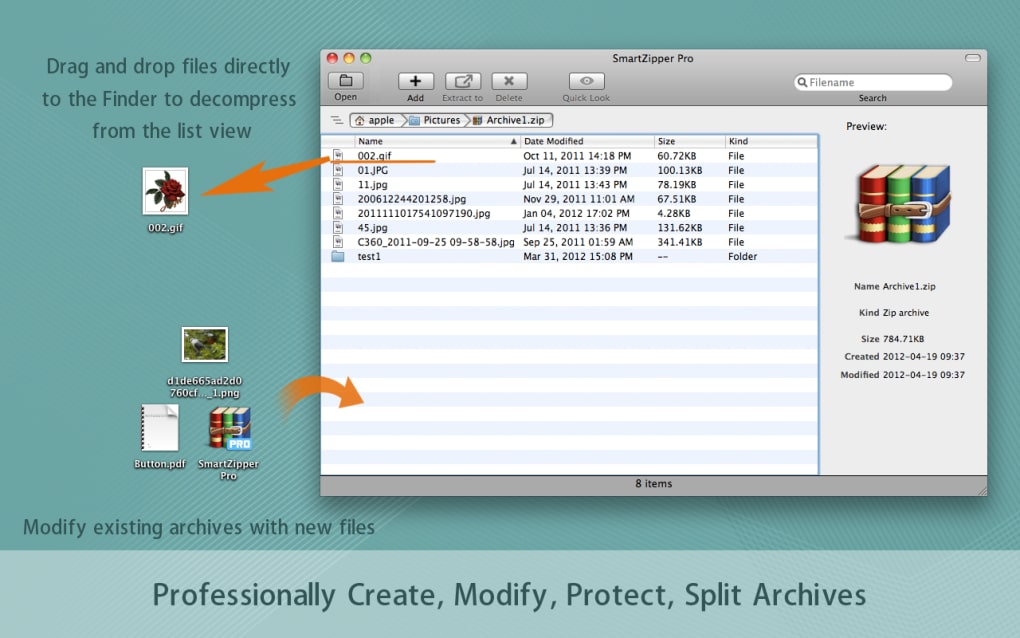
Smart Zipper Pro features a clean, minimalistic interface that prioritizes usability without sacrificing functionality. The main window displays a central dashboard with quick access to compression and extraction tools, along with a recent activity log. Navigation is intuitive, with clearly labeled buttons and a logical layout that reduces the learning curve for new users.
The workflow begins with selecting files or folders, choosing a preset profile or custom settings, and initiating the operation with a single click. This streamlined process supports rapid execution, especially when combined with context menu integration. While the developer did not specify resource usage details, the software’s 14.5 MB installation size suggests a lightweight footprint.
General software behavior patterns indicate that it likely maintains low CPU and RAM consumption during idle periods. Stability during long-running tasks was not documented, but the absence of reported issues in the release notes implies consistent performance. Users can expect a responsive interface with minimal lag, particularly for standard file operations.
Compatibility & System Requirements
Smart Zipper Pro is available for both Windows and Mac operating systems, supporting a broad range of desktop environments. The current version is 2.3.1, with a compact installation size of 14.5 MB. This indicates efficient packaging and minimal disk space usage.
The developer did not provide additional system requirements, such as minimum RAM, processor speed, or disk space beyond the installation size. As a result, exact hardware compatibility cannot be confirmed. Platform compatibility information is limited to the operating systems listed.
Users should ensure their system meets general desktop software requirements to avoid installation errors. The software does not appear to require a constant internet connection for core functionality, though updates may depend on network access. For users with older systems, the lack of detailed specs means cautious evaluation is advised before installation.
Pros and Cons
Pros
- Intelligent automation reduces repetitive manual tasks
- Strong encryption ensures secure file sharing
- Batch processing supports efficient handling of multiple files
- Lightweight installation at just 14.5 MB
- Seamless integration with file explorer for quick access
Cons
- Exact system requirements were not listed
- No information on real-time performance under heavy loads
- Offline usage may be limited without update access
- Price point of $29.99 may be high for casual users
- Limited documentation on advanced customization options
FAQ Section
Is Smart Zipper Pro compatible with both Windows and Mac?
Yes, the software is designed to run on both Windows and Mac operating systems as stated in the official release details.
Can I use Smart Zipper Pro without an internet connection?
Core compression and extraction functions do not require an internet connection. However, updates and license validation may need network access.
Is the software secure for handling sensitive data?
Yes, Smart Zipper Pro includes built-in encryption to protect archived files, helping safeguard sensitive information during storage or transfer.
How often are updates released?
While the frequency of updates is not specified, the current version is 2.3.1, indicating regular development activity.
What type of license does Smart Zipper Pro use?
The software operates under a one-time purchase model, with no mention of subscription fees in the provided information.
Final Thoughts
Smart Zipper Pro stands out as a focused, efficient desktop utility for users who demand reliable file compression with enhanced security. Its intelligent automation and encryption features make it particularly valuable for professionals handling sensitive or large-scale digital assets. The lightweight design and seamless integration into the file system further enhance its appeal.
While detailed system requirements and performance metrics are unavailable, the software’s clean interface and logical workflow suggest a user-friendly experience. For individuals and teams seeking a secure, automated solution for file management, Smart Zipper Pro delivers tangible benefits. The $29.99 price point reflects its premium positioning, making it less suitable for occasional users but a strong investment for regular power users.
Download Smart Zipper Pro now.







